

VALHEIM — For millions of virtual Vikings carving out a living in Iron Gate Studios’ brutal Norse purgatory, base management eventually transforms from a simple survival necessity into an intricate art form. Whether you are constructing a sprawling mountaintop fortress, a fortified coastal dock, or a cozy woodland cabin, organizing your vast hoards of resources is a monumental task.
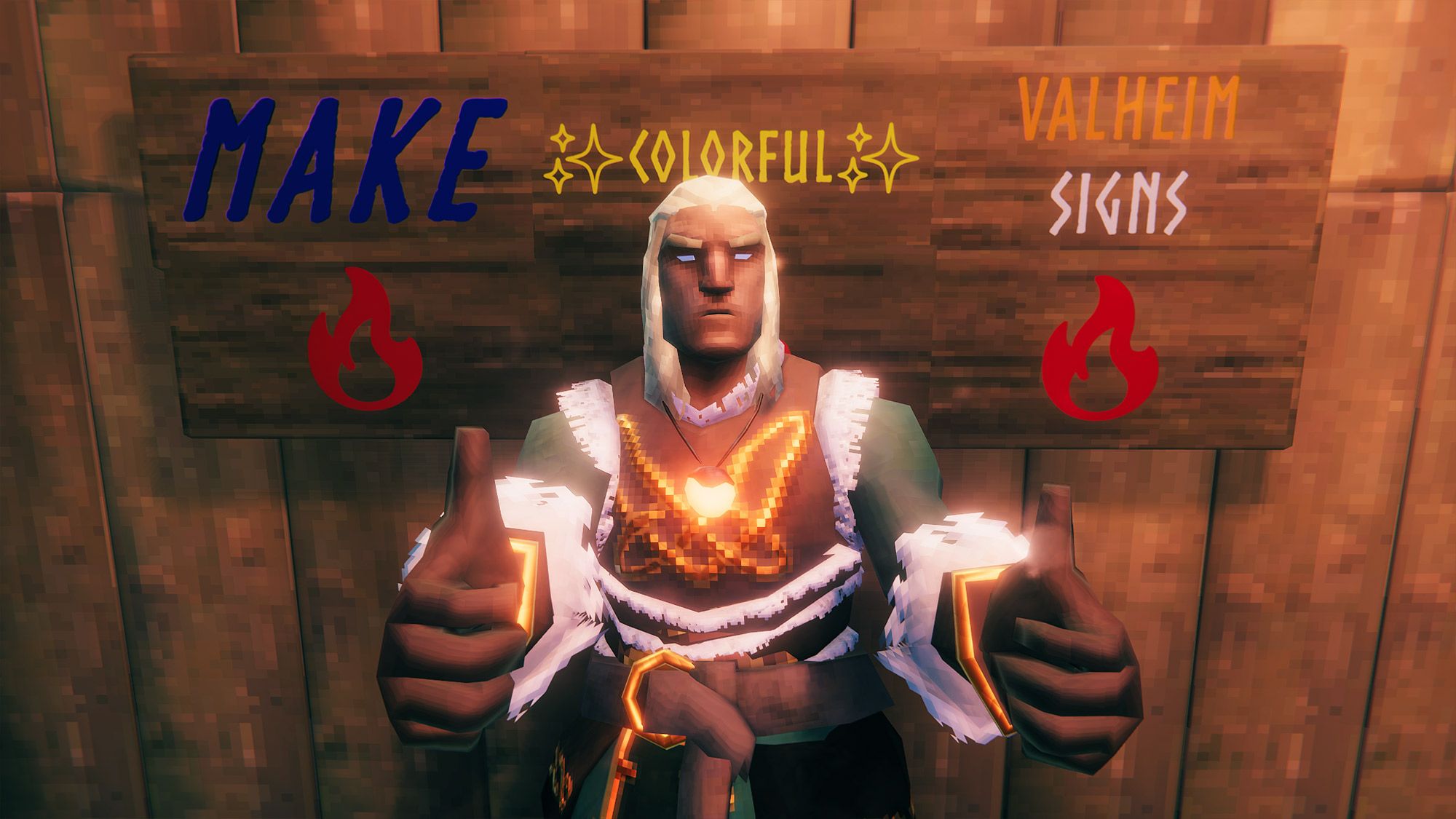
Yet, during a recent late-night lament over a disorganized, chaotic wall of wooden storage chests, a realization struck: many players—and even veteran survivors—entirely overlook one of Valheim’s most powerful, vanilla-friendly organizational tools. You do not need to install complex UI mods or third-party overhauls to bring order to your grand hall. Instead, Valheim’s built-in text formatting engine allows you to color-code, resize, and completely customize your storage signs using simple markup codes natively supported by the Unity game engine.
If your base currently relies on plain white, poorly contrasted text that leaves you guessing whether a chest contains raw ore, fine wood, or precious boss trophies, it is time for an upgrade. This comprehensive guide details everything you need to know about transforming your Valheim signage, complete with color hex codes, typographical styling tags, and Unicode symbol shortcuts.
Main Facts: How Valheim Text Formatting Works
At its core, Valheim utilizes Unity’s robust text styling architecture. Because the game relies on standard markup languages behind the scenes, players can inject specific command tags directly into the text box when writing on any wood or stone sign.
The most critical parameters to understand include:
- No Mods Required: Everything outlined in this guide works on vanilla servers, unmodded single-player worlds, and official dedicated servers alike.
- HTML-Style Logic: While you do not need to close your style tags (saving precious character space), you must format your brackets correctly.
- The Character Limit: Every sign in Valheim features a strict 50-character limit. Because markup codes (such as color hex values and size parameters) count toward this total, you must balance visual flair with brevity to avoid awkward text cut-offs or floating letters.
Chronology: The Evolution of Base Customization in Survival Crafting
When Valheim burst onto the Steam Early Access scene in February 2021, developed by the small indie team at Iron Gate Studios, players were immediately captivated by its atmospheric survival mechanics and surprisingly deep building system.
- Early 2021 (The Vanilla Era): In the initial months following launch, base building was relatively rudimentary. Players quickly realized that marking chests with signs was essential, but default text options offered zero contrast against dark wood grain or stone walls. Organization relied heavily on trial and error, placement proximity, or naming conventions.
- Mid-to-Late 2021 (Discovery of Unity Markup): As the community dug deeper into the game’s engine mechanics, resourceful players discovered that Unity’s UI text components—specifically rich text formatting—were accessible through the standard sign interface. Word spread across Reddit and community wikis that hexadecimal color codes could override standard white text.
- 2022–2024 (Expansions and Quality-of-Life Updates): With subsequent major updates like Hearth & Home, Mistlands, and Ashlands, Iron Gate introduced new building pieces, furniture variants, and materials. As base designs grew increasingly complex, the demand for sophisticated organizational systems skyrocketed, turning colorful signage from a neat parlor trick into an essential architectural standard for endgame players.
- Present Day (The Standard Practice): Today, advanced sign customization is a foundational skill for any serious Valheim architect, bridging the gap between utilitarian storage rooms and immersive, roleplay-ready Viking homesteads.
Supporting Data: Comprehensive Color Codes and Typography Tables
To help you hit the ground running, we have compiled the definitive reference sheets for sign colors, text styling elements, and Unicode symbols.
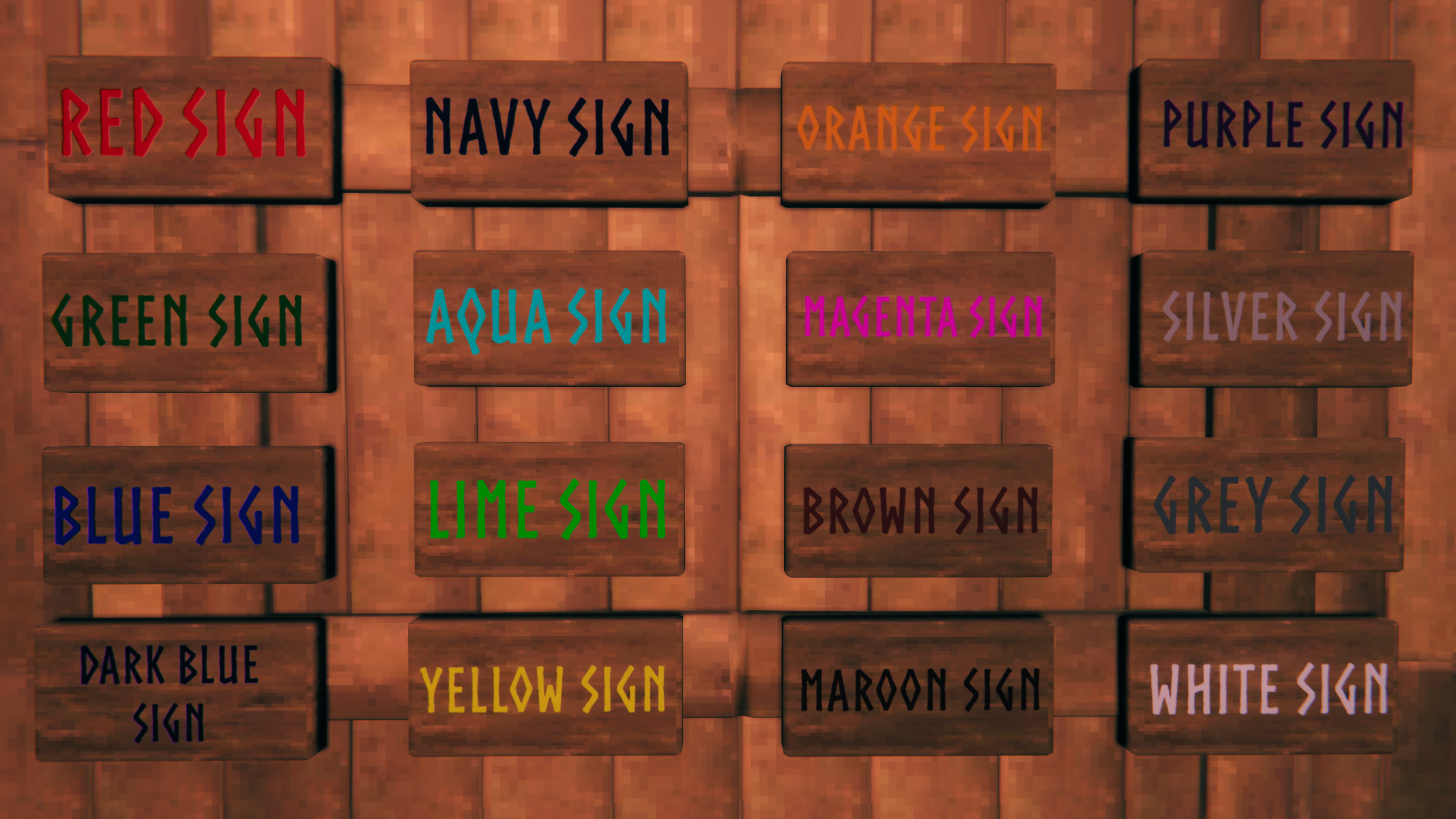
1. Essential Color Codes for Valheim Signs
You can apply any 6-digit or 8-digit hex value to your text. Below are some of the most reliable colors tested in-game, derived from standard Unity color palettes and community standards.
| Color | Hex Value | Example Code Format |
|---|---|---|
| Red | #ff0000ff |
<#ff0000ff> Red sign |
| Green | #008000ff |
<#008000ff> Green sign |
| Blue | #0000ffff |
<#0000ffff> Blue sign |
| Dark Blue | #0000a0ff |
<#0000a0ff> Dark Blue sign |
| Navy | #000080ff |
<#000080ff> Navy sign |
| Aqua | #00ffffff |
<#00ffffff> Aqua sign |
| Lime | #00ff00ff |
<#00ff00ff> Lime sign |
| Yellow | #ffff00ff |
<#ffff00ff> Yellow sign |
| Orange | #ffa500ff |
<#ffa500ff> Orange sign |
| Magenta | #ff00ffff |
<#ff00ffff> Magenta sign |
| Brown | #a52a2aff |
<#a52a2aff> Brown sign |
| Maroon | #800000ff |
<#800000ff> Maroon sign |
| Purple | #800080ff |
<#800080ff> Purple sign |
| Silver | #c0c0c0ff |
<#c0c0c0ff> Silver sign |
| Grey | #808080ff |
<#808080ff> Grey sign |
| White | #ffffffff |
<#ffffffff> White sign |
Tip: If you want to explore millions of additional custom shades, consult online tools like the W3Docs Color Hex calculator to generate custom 6-digit hex codes.
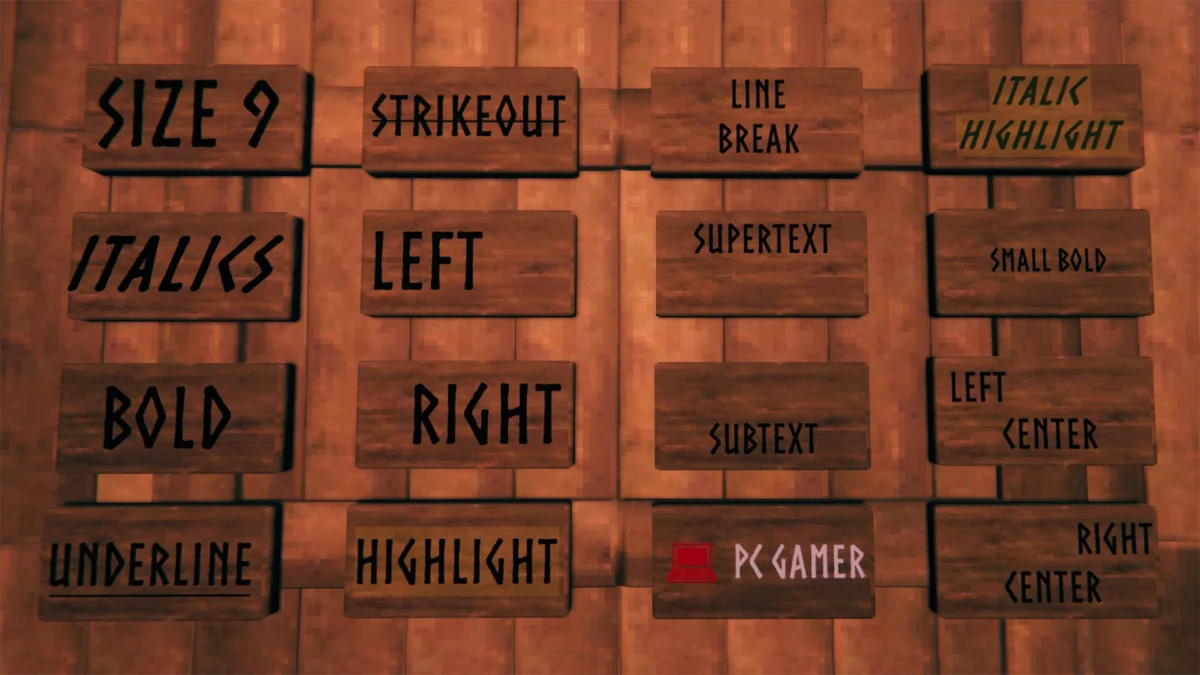
2. Text Size and Styling Elements
Beyond flat color changes, you can manipulate font weight, slant, alignment, and scale using standard Unity rich text tags.
| Element | Description | Variables / Recommended Values | Code Example |
|---|---|---|---|
| Size | Adjusts text scale up or down | Recommended: 3 through 12 |
<size=12>Size</size> |
| Italics | Slants the font | N/A | <i>Italicized</i> |
| Bold | Emphasizes font weight | N/A | <b>Bolded</b> |
| Underline | Adds a baseline rule | N/A | <u>Underline</u> |
| Strikeout | Draws a line through text | N/A | <s>Strikeout</s> |
| Align | Adjusts text placement | left, right, center |
<align=right>Right</align> |
| Highlight | Applies a background marker | Yellow (Default) | <mark>Highlight</mark> |
| Line Break | Forces text to a new line | n |
Line nbreak |
| Supertext | Aligns text to the top | N/A | <sup>Supertext</sup> |
| Subtext | Aligns text to the bottom | N/A | <sub>Subtext</sub> |
3. Unicode Symbols for Visual Item Categorization
Words take up valuable character space. To maximize efficiency, experienced builders rely on Unicode symbols to represent inventory categories instantly at a glance.
- Arrows & Pointers: Useful for directional indicators, crafting trees, or sorting flows.
- Hearts & Stars: Perfect for marking favorite items, rare drops, or magical components.
- Tools & Weapons: Ideal for armories, blacksmithing stations, and repair chests.
- Food & Provisions: Essential for differentiating raw ingredients, cooked meals, and mead bases in the kitchen.
- Nature & Weather: Great for botanical gardens, wood-cutting yards, and portal hubs.
Official Responses and Developer Context
Iron Gate Studios has historically embraced the organic ways players interact with Valheim’s systemic building mechanics. While the text markup feature was not originally designed as a heavily marketed front-end feature, the developers have consistently preserved engine-level flexibility that allows community-driven features like Unity rich text to thrive.
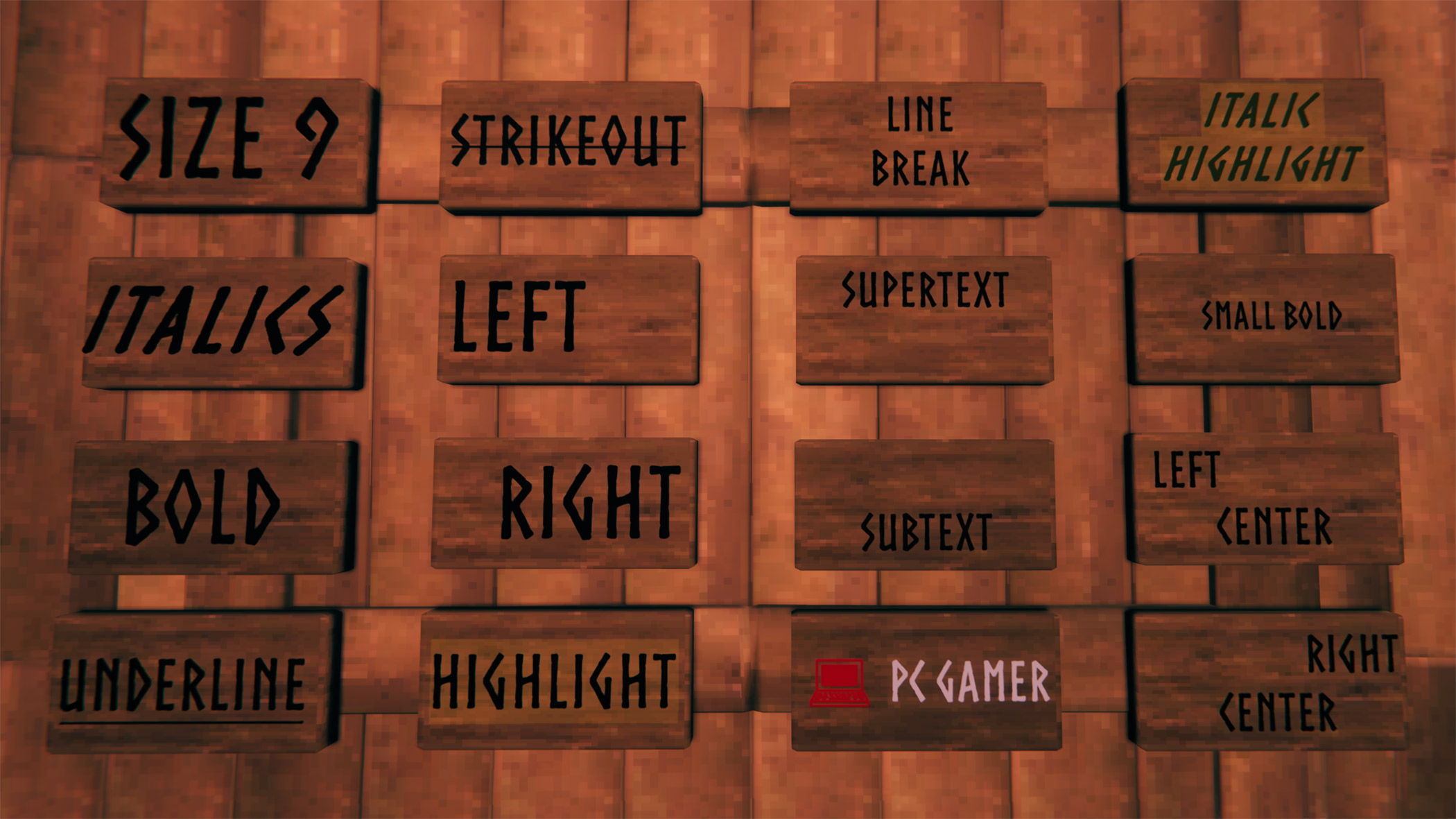
In past developer deep-dives and community Q&As, team members at Iron Gate have expressed admiration for the sheer architectural dedication shown by the player base. Features that empower players to customize their spaces—such as item stands, hanging banners, armor displays, and text signs—are viewed as core pillars of the Valheim experience. By keeping these formatting options open without requiring proprietary UI mods, Iron Gate ensures that crossplay compatibility between PC and console users remains seamless, allowing console players to view and appreciate customized base designs without running into client-side errors.
Implications: Why Base Organization Matters in Endgame Valheim
As casual players transition into hardcore survivalists tackling the harsh biomes of the Plains, Mistlands, and Ashlands, inventory management transitions from a mild annoyance to a vital survival metric.
- Reduced Cognitive Load: Returning from a dangerous resource-gathering expedition with inventory bursting at the seams requires rapid offloading. Wasting precious minutes rummaging through identical wooden chests while raids trigger outside your walls can result in catastrophic base damage and gear loss. Color-coded, clearly labeled signage eliminates friction.
- Cooperative Synergy: On multiplayer dedicated servers, base organization is vital for community harmony. When multiple Vikings share a communal longhouse, standardized color-coding (e.g., green for agriculture, red for combat gear, blue for raw metals) ensures everyone knows where items belong.
- Immersive Roleplay: Beyond pure utility, aesthetic optimization elevates Valheim from a mere survival simulator into a deeply satisfying medieval-Norse fantasy sandbox. Neatly organized armories and meticulously labeled pantries capture the authentic spirit of a thriving Viking settlement readying for the next great saga.
Take these codes, fire up your world, and bring order to the chaos of your great hall—your fellow Vikings will thank you.

