

As competitive gaming and content creation continue to intertwine, the desire to capture, edit, and share high-octane gaming moments has never been higher. Traditionally, clipping your best plays has required either manually saving replay buffers—such as NVIDIA ShadowPlay or AMD ReLive—or running heavy background recording software and spending hours sorting through hours of footage in post-production.
Enter Logitech with a fresh pitch: automate the process entirely using deep learning.
Recently previewed in Warsaw, Poland, Logitech’s new G Hub Replay software is currently rolling out in beta, promising to automatically record your matches, identify your most impressive plays using advanced machine learning models, and splice them together into a polished highlight reel.
Curious to see if the technology lived up to the marketing hype, we put the free-to-download software through its paces in Counter-Strike 2 (CS2). The results, while demonstrating immense potential, reveal that automated AI-driven editing still has a steep learning curve ahead.
Main Facts: What is Logitech G Hub Replay?
Logitech G Hub Replay is an experimental software package designed to streamline the game-recording and editing pipeline. Rather than forcing players to manually mash a hotkey every time they hit a lucky headshot or pull off a clutch, the application runs continuously in the background.
Key facts about the current beta include:
- Deep Learning Highlight Detection: The software utilizes deep learning algorithms (technically distinct from generative AI, but functioning similarly under the hood of pattern recognition) to analyze gameplay footage and isolate exciting moments—primarily kills, multi-kills, and key objective plays.
- Broad Game Compatibility: At launch, the beta supports an initial roster of 44 popular titles, with lists expanding as Logitech refines the software.
- Storage and Performance Management: Users can cap the maximum storage allocation for recordings to prevent hard drives from filling up, though hitting the limit results in older footage being automatically pruned.
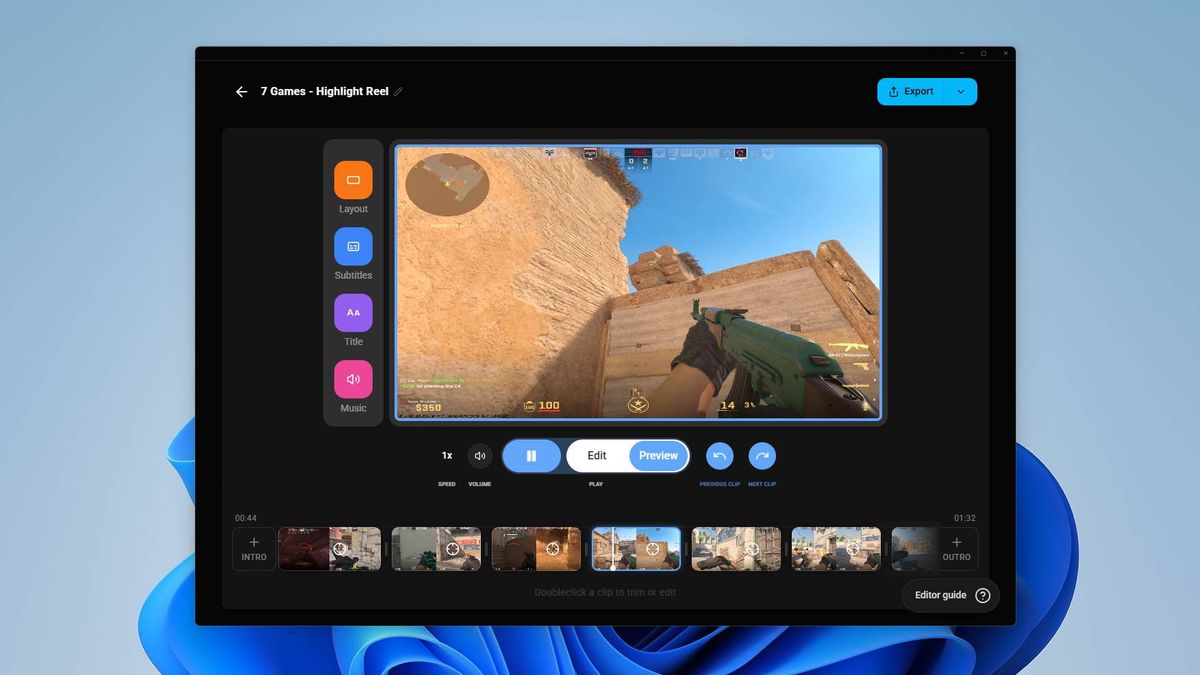
- Built-In Editor: If the automated algorithm misses the mark, users are not entirely beholden to the AI. The software includes a native editing suite that lets players comb through the raw recording timeline, easily adding or removing clips to construct a custom montage.
Chronology: Putting the Beta Through a CS2 Deathmatch
The testing process began with high expectations following a sleek presentation in Warsaw. Eager to test the software in a real-world scenario, the beta was installed, configured, and pointed toward Counter-Strike 2.
The Initial Test: Deathmatch and Casual Matches
The first test run consisted of a full Counter-Strike 2 deathmatch followed by the first half of a casual game. Once the matches concluded and the software processed the footage, the automated highlight reel was reviewed.
The verdict? A distinct lack of anything remotely impressive.
Out of two intense matches featuring plenty of fast-paced combat, the software selected a meager handful of clips. Worse still, the chosen moments were profoundly pedestrian—standard body-shot kills and uneventful trades that hardly screamed "highlight reel." This was particularly baffling given that the latter half of the deathmatch featured high-skill plays, including crisp Desert Eagle eliminations, rapid Scout quickscopes, and an acrobatic flick noscope.
The Control Test: Isolating a Single Deathmatch
Skeptical that the software simply failed to register the intensity of the matches, a second test was conducted: a single, isolated Counter-Strike 2 deathmatch game recorded from start to finish.
This time, the AI’s automated selection produced just one single, thoroughly mediocre clip.
Taking Matters into Our Own Hands
Fortunately, the G Hub Replay software does not lock users into the AI’s automated choices. Armed with the raw recording of that same deathmatch, the manual editing suite was put to work.
In roughly five minutes of hands-on curation, sifting through the timeline and manually selecting the true high-water marks of the match, a far more compelling montage was assembled. The manual edit proved that the player’s performance was not nearly as dismal as the Logitech software’s initial AI selections implied; rather, the algorithm simply struggled to recognize what constitutes a genuinely "good" play in Counter-Strike.
Supporting Data & Technical Performance
While the AI’s curation capabilities left something to be desired during early testing, other aspects of the G Hub Replay software performed admirably.
- System Overhead: One of the historic pain points of background recording software is performance degradation. Titles like Counter-Strike 2 rely heavily on high and stable frame rates (FPS). During testing on a high-end gaming rig, zero noticeable performance impact was observed while G Hub Replay was actively recording. However, because hardware specifications vary widely, users on mid-range or budget setups should monitor their frame rates closely during extended gaming sessions.
- User Interface and Workflow: The software triggers a subtle visual pop-up confirmation as soon as a supported game launches, indicating that background capture is active. Upon exiting the game, users are immediately greeted with the dashboard where automated clips await review.
- Storage Footprint: Raw video capture—especially at high bitrates—eats up disk space rapidly. Logitech’s inclusion of a storage cap is a necessary safeguard, though users will need to balance video quality settings with available SSD capacity.
- Game Library: Logitech currently lists 44 compatible titles on its official website. While the feature set works wonderfully for tactical shooters like CS2, its efficacy across entirely different genres—such as MOBAs, battle royales, or fighting games—remains to be thoroughly vetted by the community.
Official Responses and Industry Context
Logitech has positioned G Hub Replay as a major step forward for its G Hub ecosystem, aiming to bridge the gap between casual players who want to share cool moments with friends and hardcore content creators who lack the time to sift through hours of raw gameplay footage.
While Logitech has not yet released formal statistics regarding the beta’s adoption rate or accuracy metrics, the company encourages user feedback through its community forums and support channels. Because the software is entirely free to download and try, Logitech is effectively crowdsourcing the training data and edge-case scenarios needed to refine its deep-learning models.
Competitors in the hardware and software space—such as NVIDIA with its ShadowPlay Highlights and Medal.tv as a standalone platform—have wrestled with similar algorithmic challenges. Automatically detecting game state events (like a kill in a shooter or a goal in a sports game) requires tight API integration or robust visual pattern recognition. When games receive frequent patches, updates, or visual overhauls (as Counter-Strike 2 frequently does), these algorithms can easily become disoriented, which likely accounts for some of the software’s current misfires.
Implications: The Future of Automated Content Creation
What does the current state of Logitech G Hub Replay mean for PC gamers?
- AI is a Tool, Not a Replacement for Taste: The software highlights the current limitations of machine learning in creative workflows. While deep learning can successfully ingest raw data and isolate basic triggers (like a crosshair intersecting with an enemy model followed by a health drop), it lacks the human intuition required to gauge style, flair, or context. A basic kill achieved through pure luck looks identical to a calculated 1,500-hour veteran flick-shot to an algorithm.
- The Frictionless Editing Dream is Alive: Despite the poor clip selection in early testing, the core premise of G Hub Replay—seamless, background-recording architecture paired with a quick manual fallback editor—is fundamentally sound. If Logitech can improve its AI tagging logic through upcoming beta patches, it could become an indispensable tool for everyday gamers.
- An Open Invitation to Test: Because the software is free and lightweight (at least on powerful systems), it costs nothing for players to test it out. Logitech’s long-term success with this feature will heavily depend on community telemetry.
If you are a PC gamer looking to capture your own highlights without paying for third-party subscription software, downloading the G Hub Replay beta and leaving it running during your next competitive match is well worth an afternoon. Just be prepared to roll up your sleeves and use the manual editor if your AI co-pilot decides your best plays aren’t worth remembering.

